Open in apps.
Clean the URL.
Switch modes fast.
Send links to native apps, strip tracking parameters, and switch between default, Clean Only, and Apps Only in seconds. Everything runs locally on your device.
Fixed instantly
- Tracking params
utm_*, fbclid - Maps
Google -> Apple - AMP pages
-> Original - Short links
bit.ly -> real
30+
Supported apps
14
Languages
100%
Local processing
$2.99
Lifetime Premium
What it does
Every link, under control
Eight powerful tools packed into one Safari extension. Enable exactly what you need - nothing more.
Open in Native Apps
Automatically open YouTube, Twitter/X, Reddit, Spotify, Maps, and 25+ more apps instead of the mobile web.
YouTube -> YouTube app Twitter -> X app Spotify -> Spotify app Tracking Cleaner
Strip utm_*, fbclid, gclid and 100+ tracking parameters from URLs before you even see them.
AMP Remover
Get the original article instead of Google's slow AMP version. Clean, fast, and ad-free.
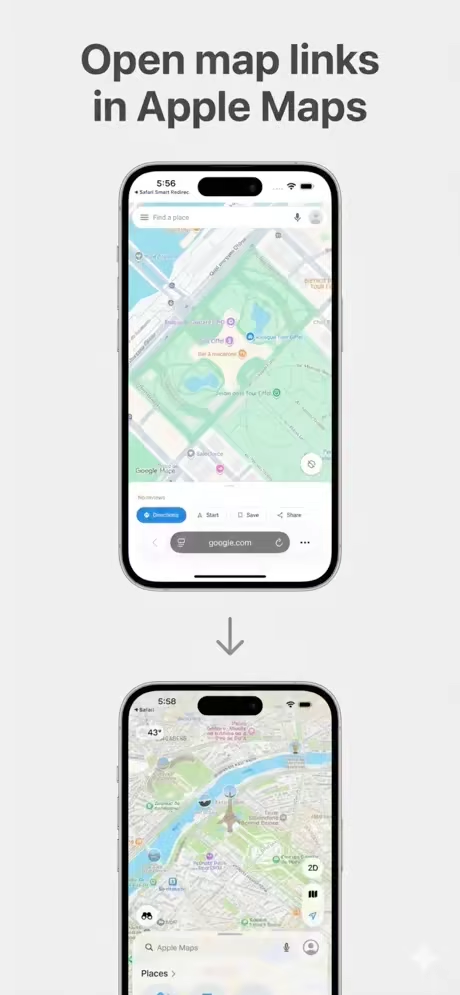
Maps Redirect
Google Maps links open in Apple Maps automatically. Navigate with Siri and offline maps.
Short Link Expander
Resolve bit.ly, t.co, tinyurl and other shortened links to their real destination.
Profiles
Switch between Work, Personal, and Travel profiles. Each has its own preset rules so context-aware redirects just work.
Per-Site Rules
Exclude specific domains from any preset. Fine-grained control - your rules, your browser.
Privacy First
No servers. No clouds. All redirect decisions happen in milliseconds on your device. Your URLs never leave your iPhone.
Setup in minutes
How it works
Three steps. No accounts. No config files. Just cleaner links everywhere.
Install the app
Download Open Links in Apps from the App Store. Free tier is available immediately - no signup required.
Enable in Safari
On iPhone/iPad: Settings -> Safari -> Extensions. On Mac: Safari -> Settings -> Extensions. Toggle on and grant permission.
Pick your presets
Open the app and enable the redirects you want: native apps, tracking cleanup, AMP remover. Done. Tap any Safari link to see it work instantly.
Universal Purchase
Buy once on the App Store and use on all your Apple devices - iPhone, iPad, and Mac (macOS 15+). One payment covers everything.
See it in action
Clean. Fast. Native.
A native iOS interface designed with clarity - tap any screenshot to enlarge.

Main Dashboard

Preset Rules

Quick Modes

Per-Site Settings

Redirect Logs
Pricing
Simple, honest pricing
Start with the core flow for free. Upgrade once for faster switching and more control.
Free
Core redirect + cleanup with 1 active preset
- Open links in native apps
- Tracking parameter cleanup
- AMP and short link cleanup
- 1 active preset
- Pause mode
Lifetime Premium
Best valueOne-time unlock for faster switching and more control
- Unlimited presets
- Quick Modes (Clean Only, Apps Only)
- Profiles (Work / Personal / Travel)
- Smart Suggestions
- One purchase for iPhone, iPad & Mac
All purchases are processed securely by Apple. Refunds available via Apple's standard policy.
FAQ
Common questions
Can't find your answer? Email us directly.
Why doesn't the app open when I tap a link?
Make sure the Safari extension is enabled. On iOS: Settings -> Safari -> Extensions. On macOS: Safari -> Settings -> Extensions. You may also need to grant permissions the first time.
How do I enable the Safari extension?
On iPhone or iPad: open the Settings app, tap Safari, then Extensions. On Mac: open Safari, go to Settings (Cmd+,), then Extensions. Find Open Links in Apps and toggle it on.
Is there a free version?
Yes. The free tier includes core redirect and cleanup features with one active preset. Lifetime Premium unlocks unlimited presets, Profiles, Quick Modes, and smart suggestions.
What data does the app collect?
Core redirect processing is 100% local on your device. App settings and logs are stored on-device. Optional crash diagnostics (Sentry / Apple MetricKit) can be controlled in Settings.
Will this slow down my browsing?
No. Redirect decisions happen locally in under a millisecond. There are no network requests for the core engine, so browsing speed is completely unaffected.
How do I disable redirects for one website?
Open the app, go to the Per Site tab, tap the + button, and add the domain (for example: example.com). Links from that site will no longer be redirected.
Can I use this with other Safari extensions?
Yes. Open Links in Apps runs alongside other extensions. However, aggressive content blockers may interfere with some redirect chains.
Does it work on Mac?
Yes. Open Links in Apps supports macOS 15.0 (Sequoia) and later on both Apple Silicon and Intel Macs. It's a Universal Purchase - buy once and use on all your Apple devices.
Still need help?
Email Support